
The Hired Gun
AI Model Naming: A Field Guide to the Naming and what Quants actually are.
As I've been working with Strata Inference, my interest in the naming convention peaked, and I've had a few people ask me why the naming convention is different than the other models. Strata itself doesn't 'quantize' anything. It's an inference engine, designed for only one model (so far), Qwen3.8-Flash-Next. If you aren't familiar Qwen3.8 Flash Next is a 125B (as in 125 BILLION) parameter model.
Model Type: MoE vs Dense
Qwen3.8 Flash Next is a Mixture of Experts model (MoE). Which means it does NOT have an 'attention window' to hold a smaller chunk active in memory. Comparatively, QWEN3.8 27B, is a DENSE model. When you load a dense model, it will try to load ALL of the 27 BILLION parameters into VRAM (GPU memory) at once.
Token Speed: Memory Bandwidth + Compute
So in order to understand token speed we have to make it relational to users who aren't familiar. Video Random Access Memory (VRAM) is a special kind of memory that lives right next to the Graphics Processing Unit (GPU) core(s). This memory lives on the card itself.
Scale: VRAM Speed
This is where people get tripped up, because we use two different rulers.
Bit vs Byte
Stick with me because this is the key to understanding the entire problem with Quants and AI Models. A bit (lowercase b) is a single 1 or 0.
A Byte (capital B) is 8 bits bundled together to actually store something. The average home's network runs at 1 Gigabit per second (about 125 MegaBytes/s). Your Internet Provider sells you internet in bits, Megabits and Gigabits because the number sounds 8x bigger.
Your computer measures everything else in Bytes; Megabytes and Gigabytes, because that's what files actually are.
So when you have a "1 Gig" internet plan, that's 1 Gigabit per second, which is 1,000 Megabits ÷ 8 = 125 Megabytes per second.
When we start to talk compute we are speaking an order of magnitude faster than when we talk about internet connection speeds. Your 7,000 MB/s SSD isn't 7x faster than your internet, it's 56x faster. Your hard drive reads and writes at anywhere from 160 MegaBytes per second for old spinning drives to ~14,000 (14 GB/s) for new Gen5 NVMe SSDs.
Your system RAM, the newest stuff on the market DDR4/DDR5 is only ~40,000 to 80,000 MegaBytes per second (40-80GB/s). VRAM is ANOTHER order of magnitude faster than the system layer. The GPU can read VRAM at speeds of ~500 to 1000 GB/S... that's 1/2 a TERABYTE to 1 TERABYTE of transfer speed per second. Your VRAM at 1,000,000 MB/s is 8,000x faster than your home internet connection at 1 Gb/s (125MB/s).
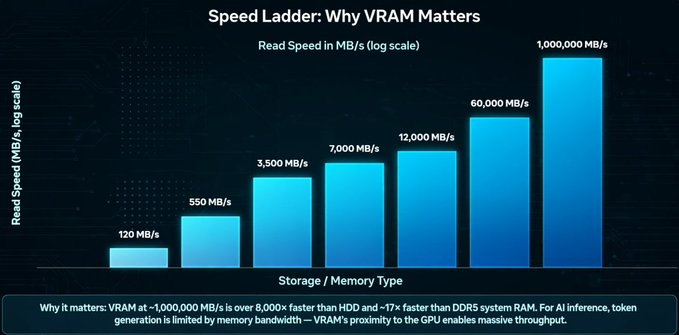
Bringing It All Together VRAM is the fastest memory on your computer because of the proximity to the Graphics Processing Unit (GPU) cores. There is literally no distance to travel, and nearly no loss due to transfer. Memory Bandwidth + Compute: If you have enough VRAM, your model runs as fast as possible, because your token speed is a product of memory bandwidth. Think of memory bandwidth as internet speed, but internal to your motherboard, GPU(s), memory and CPU. Parameters, The Final Piece of the Puzzle A Parameter isn't exactly the same type of measurement as the bits and bytes, but it can be roughly converted. Think of a parameter as one learned 'knob' the model turns. The space a parameter takes depends on how much precision is stored. This literally means how many zeros follow the decimal place.
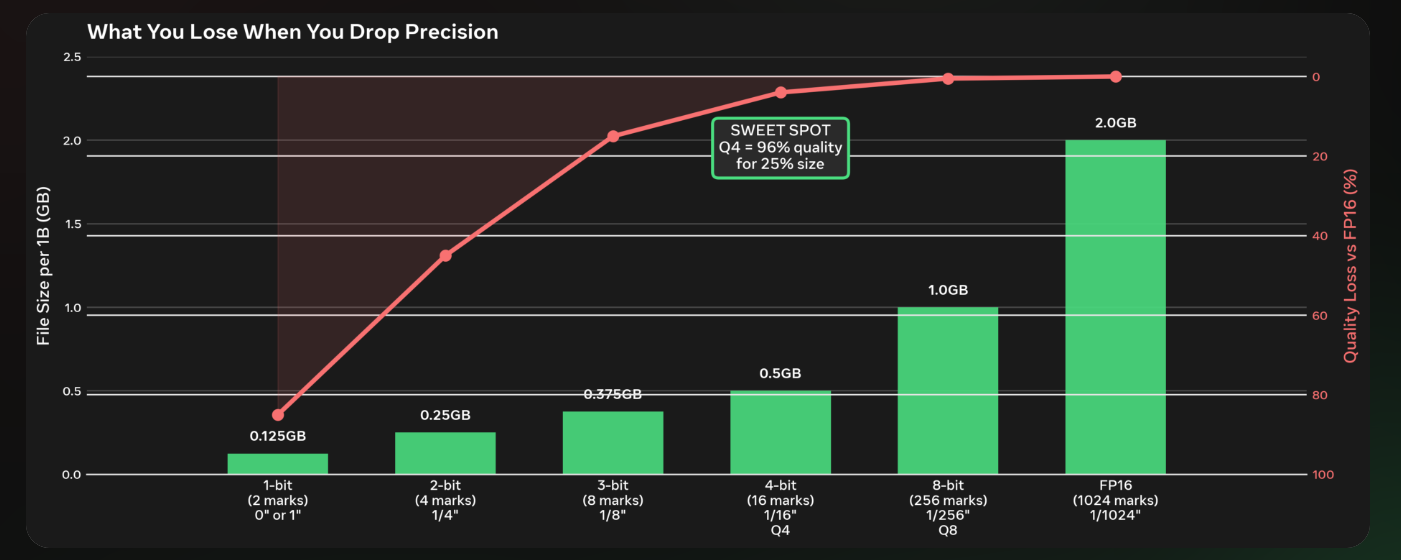
To help illustrate, think about precision like measuring a cut on a board. Picture pulling out the tape measure and making your mark for the cut.
A 1-bit cut would be making your cuts on only the 1-inch lines, 0" or 1", that's it. 2-bit precision would be making those same cuts at the 0, 1/4, 1/2, 3/4 marks. 3-bit would be 1/8" increments, 4-bit is 1/16", 8-bit is 1/256", FP16 (10 bits of mantissa) is 1/1024.
Every bit you add cuts the space between your last marks in half. At full 16 bit precision (FP16): 1B params is about 2 Gigabytes. 8 bit is 1B/2 Gigabytes, 4 bit, half a Gig or 500 Megabytes So! The core of the Quants. When you see a 27B Dense model at Q4 you now know the model is (roughly) 13.5GB 27B/ 4 bit (27 x .5) = 13.5.
Dense Model Token Speed Now we can understand a few things. If you only have an 8GB GPU (8 Gigabytes of VRAM) and you load a 3B parameter model at Q4 (3B x 0 .5 = 1.5GB), You only use 1.5GB of your VRAM to hole the model's weights. This leaves the rest of the card open to hold context as you talk, the token generation will sky rocket because the entire model fits in the VRAM.
Load a 9B model at Q4 (9B x 0.5 = 4.5GB) your still good, you have 6.5GB of VRAM open for context. HOWEVER, 9B at FP16 (1/1024 precision) 9 x 2 = 18GB, you don't fit. Your token speed would slow to a crawl because, your model now has to be split. Why 9 x 2?
FP16 is called 16-bit because every parameter takes 16 bits to store. 16 bits ÷ 8 bits per Byte = 2 Bytes per parameter. So 9 Billion parameters × 2 Bytes = 18 Gigabytes.
The remaining portion of the model weights need to go to system RAM (From TERRABYTE to GIGABYTE speed) or in some cases if the model is really large it needs to be pushed to hard drive space (MEGABYTE speed). How To Read A Quant Name
This is what it means when you see a quant like IQ2_XS, Q2_0, IQ3_S, IQ3_XXS, UD-IQ4_XS.
Think back to the tape measure.
The Letter: Q vs IQ
Q = Old-school quant. It just rounds everything.
IQ = Importance Quant. It actually looks at which knobs matter more. It spends more precision on the important weights, less on the boring ones. Same size, smarter cut.
The Number: 2, 3, 4 This is the bit target, the tape measure we talked about.
Q2 / IQ2 = 2-bit = 4 possible marks (0, 1/4, 1/2, 3/4)
Q3 / IQ3 = 3-bit = 8 possible marks (1/8" increments)
Q4 / IQ4 = 4-bit = 16 possible marks (1/16" increments)
The Size: _XS, _S, _XXS This is how aggressive the packing is. It's file size vs accuracy.
_XXS = Extra-extra small file, most aggressive, lowest accuracy
_XS = Extra small
_S = Small
No suffix like Q2_0 = baseline size for that quant
So IQ3_XXS is smaller than IQ3_S, even though both are 3-bit. XXS just throws away more of the less-important stuff to save space.
The UD- Prefix: UD-IQ4_XS UD = Un-Dynamic / Ultra-Dynamic, newest generation from ik_llama.cpp. It's a smarter way to group the weights before it quantizes them. Think of it as a better way to bundle the boards before you make the cuts. Same 4-bit target, same _XS size, but better quality for the same file size.
IQ3_XXS (smallest) -> IQ2_XS -> Q2_0 -> IQ3_S -> UD-IQ4_XS (largest / best quality)
Comments 0 in this thread